
With computers, writing screenplays has become more accessible thanks to software like Final Draft, Fade In, and SoCreate (now in open beta). Of course, the software will never write for you, but it will help you set the correct formatting.
With all this technology available to writers, why would you use an old typewriter machine to do a movie script?
That is a good question; Final Draft is one of the most used software available, and you can efficiently distribute a PDF version of the file to producers, directors, actors, etc. So why do it with a typewriter machine?
I would dare say, “Why not?”
Gibson wrote ‘Neuromancer’ on a typewriter, you know, before the technology he was writing about existed.
Ernest Cline
Even though writing your first draft on any screenwriting software would be convenient, I like to work the first draft via a typewriter. So if you’re still unsure about it, start small. I recommend starting with a short script. A two to five-page script. Write it on a Pica typeset (10 characters per inch) typewriter machine. All you’ll need to do afterward is to scan the script and import it into the script formatting software. That way, you can revise it and work on as many drafts as you need to polish it.
In other words, write your first draft manually, digitize it, and then edit it on software. You might surprise yourself with the experience.
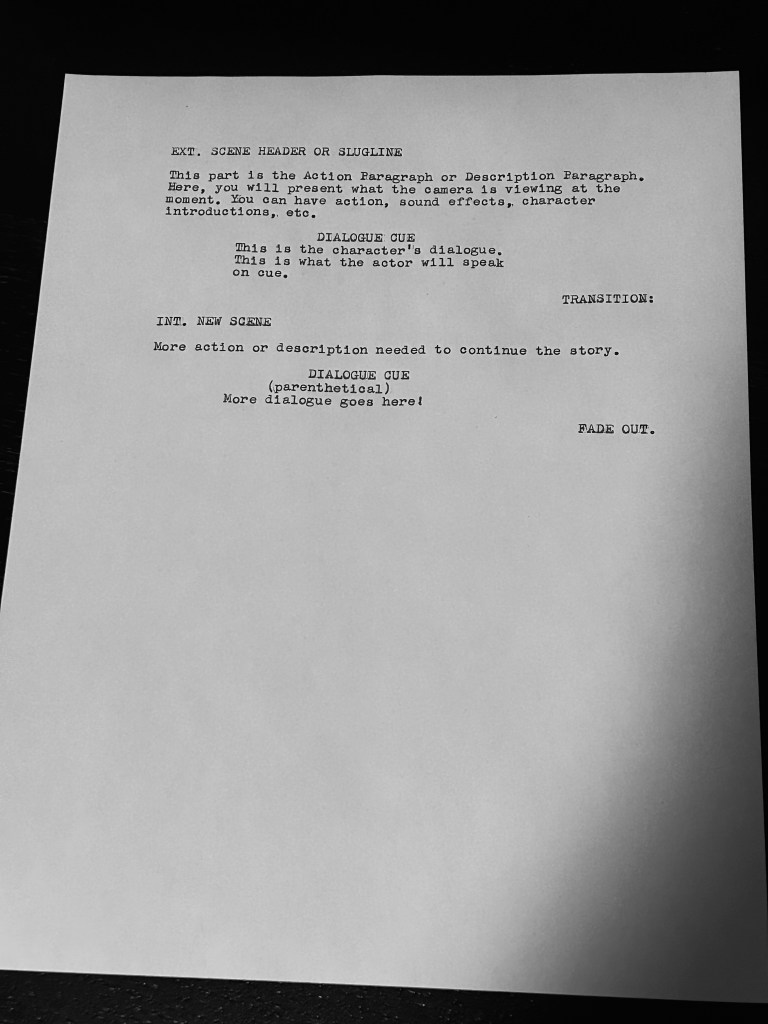
If you choose to use a typewriter to create a screenplay, the margins are:
- Scene Headers and action: left 1.5 inches to right 7.5 inches.
- Character Cue: left 3.5 inches.
- Parenthetical: left 3 inches.
- Dialogue: left 2.5 inches to right 6 inches.
- For transitions, start at right 7.5 inches and backspace the numbers of letters, including spaces, that the transition has. For example, ‘FADE OUT.’ is nine backspaces.
 Ed-Santiago.com